Showing posts with label factoring trinomials. Show all posts

Thursday, March 29, 2012

Algebra Factoring Simulations and Games—Now On HippoCampus.org!

Algebra tutor simulations and puzzles (including two on factoring!) from NROC’s Algebra 1--An Open Course are now available to everyone on HippoCampus.org! A student can be assigned to complete a tutorial or reach a certain score on a game and send you a screenshot that shows completion.

The puzzle and sim linked to here deal with factoring trinomials. If you’d like to browse more interactive algebra resources, go to the “Algebra and Geometry” section of HippoCampus.org and scroll down past the “Test Prep” in the leftmost frame until you see “Simulations.” Click on “Algebra 1—An Open Course (2011),” and a list will appear.  Click on the “Tutor Sim” or “Puzzle” you wish to view.

Learning Objective(s)

•    Understand how to factor trinomials.
•    Know how to take and submit a screenshot to a teacher.

Assessment Type

This assignment is designed for completion by the students at home. Completing the tutor simulation takes 10 minutes or less; the time spent on the factoring game can be about the same. The resources linked to here deal with factoring trinomials and are best used as part of a review (perhaps in conjunction with or just before assigning a more formal practice test) a bit before a test on the material.

Assignment Details

Students will access the tutorial and games at home via the internet and use them to review factoring trinomials. To show completion, they will send in a screenshot.

For students to reach these online tools, they will need access to an internet enables computer with working speakers. They’ll want to have the browser window maximized and also “maximize” their view of the tutorial or simulation by clicking on the “+ Maximize” button circled in red below. 
On a side note, if you wish to link to a puzzle, simulation, or any presentation on Hippocampus.org click on the little symbol that looks like a link to get the correct URL. It is third to the right after the maximize button circled above, next to the "+". Copy/pasting directly from your browser will not work.


The Tutor Simulation--Factoring: Perfecting the Long Kick in Soccer
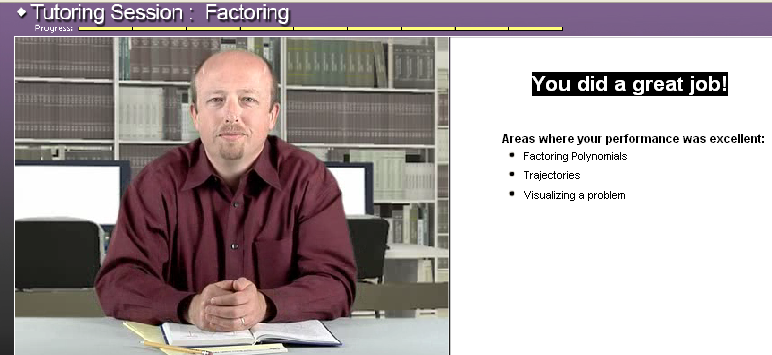
The simulation linked to above uses an example where the student factors a quadratic equation with a lead coefficient other than 1. Assign the student to work until they reach the end of the tutorial simulation and receive feedback on their performance. They'll need to take a screenshot of the feedback to show completion. An end-of-sim screenshot example is here.

The puzzle linked to here has students select correct factors for quadratics from multiple possibilities. The format encourages guessing. If you want students to fully solve each problem instead, you may want to require that they turn in a written copy of their work as well as a high score screenshot.

Take a moment to play this game and decide what level or levels you wish your students to play. Assign the student to play until they reach a certain score (100, for example) on a certain level. Once they reach that score, they should use screen capture, and email (or drop box) an image showing the problems still on their screen and their score. You’ll want to see the problems on the screen, not just the score, to ensure they are working at the assigned level. An example screenshot is below with the score circled in red.


Instructor Notes

•    You will need to check that students know how to take a screenshot on their computers. Demonstrating this for them can help, but there are also a lot of online tutorials that they can Google. Here are two I found:    How to take a screenshot on a PC.    How to take a screenshot an a Mac.

•    They'll want to paste their screenshots into an image editor, such as Microsoft Paint, so they can crop them and save them in the correct format. They should take care when cropping their images to exclude any inappropriate or private information in the background of the screenshots they submit.


•    Be sure students understand which file formats are acceptable and how you wish files to be named “LastNameFirstNameFactoringGame.jpg,” for example.

•    If you have a class email list, it may be easiest to send students an email with links to the simulation or game and an explanation of how you wish them to submit their work (email or drop box and what file format) as well as links to the screenshot tutorials.

Rubric

Most students will either complete or not complete this assignment. Very few will submit an item that receives partial credit. If you receive a note like, “I earned 100%!” without screenshot proof, it is up to you as to whether you wish to credit it or not. In general, I recommend you assign total credit as you would for a normal homework assignment that takes about 10-15min to complete.

I hope your students have fun, and let me know what they think!

Saturday, December 31, 2011

Factoring and Checking Answers

“Am I right?”
This is a question the student should be able to direct at him or herself, not the teacher. This lesson on factoring reinforces students’ ability to check their work while reviewing both factoring and polynomial multiplication. Students then use the practice problems from NROC’s Algebra 1—An Open course, Unit 9 - Factoring, Lesson 1, Topics 1, 2, and 3 (these cover factoring out greatest common factors and factoring simple or advanced trinomials by grouping) to develop skills in checking their own work.

Learning Objective(s)

•    Understand how to factor out the greatest common factor and to factor trinomials.
•    Practice checking that one has factored correctly. 
•    Practice solving and checking for correctness on all problems.

Assessment Type
This lesson is designed for the 55-minute high school algebra class, but can easily be modified to fit a variety of contexts.  It can be used when students are ready to practice trinomial factoring, well after the initial introduction of polynomial factoring. Alternately, it can be used as a general review of how to check one’s work and as standardized test practice if one selects a wider variety of practice problems from multiple topics.

Assignment Details

15min: Review factoring with warm up problems of your choice or use the factoring game, Puzzle: Match Factors, provided as part of this unit (Unit 9). If using the game, note that the different levels provide problems from different types of factoring.

10min: Brainstorm on the board all the different ways that one can check work on different types of algebra problems. Stress that the ability to self-check is important for taking final exams and standardized tests, not to mention in real life where one has neither a teacher nor a textbook to provide correct answers. For the algebra problems, provide examples of different types of problems if needed and/or have students pull examples from past homework and tests. Focus on the two ways that you can check factoring problems, as this is the newest concept.  Students should record the results of the brainstorm as notes.  (Examples of how answers can be checked are listed in Instructor Notes below.)

5min: Have students get out notebook paper for an in-class assignment that they will turn in at the end of the day. Pull up the practice problems from Unit 9, Lesson 1, Topic 1: Factoring and the Distributive Property, under the link titled “Practice” which covers factoring monomials. Show the students how to first solve the problem and record checking their work. The class assignment is to complete all practice problems from all three topics with both steps to the solution and work-checking shown. It’s up to you whether you want to require them to show their check two ways (both by evaluating and by multiplying the factors back together) or just one or the other. Also select and do an example problem from Topic 2: Factoring Trinomials by Grouping 1 to ensure students don’t get stuck here. A Topic 3 example may also be needed. Do note that NROC teaches factoring by grouping, not by “un-foiling” so be sure that your students understand this method before unleashing them on these problems.

20min: Students work to complete these problems on internet-enabled computers (working in groups as necessary), recording both the steps in their work and their answer checks on their paper as shown. Students who finish early can begin their homework or play an NROC math game of their choice.

5min: Check in with the class about the progress made. Which problems were the hardest to check and why? Anything that the brainstorm missed? Make sure to collect work from the day and that any homework assignment is recorded.

Instructor Notes
•    To check a “Solve for X” problem: Put in the variables that you solved for. Does the left side equal the right side when evaluated for the values found? (Common pitfalls: Arithmetic errors. Copying errors.)
•    To check a simplification problem: Take the expression and evaluate numbers in both the original un-simplified and simplified forms. For example, X + X + X + Y simplifies to 3x+y m Put in x=2, y=4 and see if 2 + 2+ 2+ 4 = 3*2+4.  Does it? Then you’re probably right. (Common pitfalls:  Arithmetic errors. Copying errors. False positives can occur, especially if students use the same number for two different variables, use 0 or 1, or use a number that is also a coefficient in the problem.)
•    To check a graphing problem: Use a graphing calculator if allowed. After graphing, choose two clear, whole number (x, y) points from your graph. Use the X coordinate and Y coordinate values in the equation that you made the graph with. The equation should be true when evaluated for each point (the left side should = the right).
•    Factoring: Check by multiplying back together. Can also check in the same manner as simplifying (evaluate with a number of your choice, factored and un-factored results should match).
•    Multiplying: Check by factoring. Can also check in the same manner as simplifying (evaluate with a number of your choice, multiplied and un-multiplied results should match).
•    Systems of equations: Check results in all equations. Graph with a graphing calculator, lines should intersect at the (x,y) point that matches the values solved for.
•    Solving by factoring: Evaluate solutions in original, un-factored equation.
•    For the brainstorm notes: Recording the results on a large class poster can be a great alternate assignment for a couple of strong students during the online practice portion of the class. This will also make it easy for any absent students to catch up on notes from today’s lesson when they return to class.
•    This assignment can be repeated with the “Review” problems instead of the practice problems as an introductory activity tomorrow or as a review before an exam that focuses on factoring.

Rubric

As this is an introductory assignment participation should be the focus of grading. Any student who stayed on task and turned in a complete exit slip (or provided class notes) should receive full participation credit for the day. If kept in an organized notebook, notes can be graded on a later day.
2pts--Arrived on time, stayed on task, and participated with class.
3pts—Work is neat and organized according to expectations.
5pts—Student completed the expected amount of completed practice problems showing the self-checking of answers.
Total= 10pts
You can also grade an activity like this with a rough “Plus, check, minus, zero,” format where a plus is worth 100% credit, a check is 75%, minus is 50%, and zero, 0%.